 Deish Media
Five analyzers. One window.
Spectrum, spectrogram, oscilloscope, goniometer, and the full BS.1770-4 loudness suite, all reading the same signal at once. Prisma is a pass-through analyzer, so it never touches your audio.

Five analyzers, one window
Spectrum across the top, oscilloscope and goniometer below it, level and loudness metering down the right edge. Every divider drags, every panel has its own gear, and the arrangement saves with your session. Each analyzer below carries its colour from Prisma's own spectral ramp, the same five hues the plug-in draws across 20 Hz to 20 kHz.
Spectrum
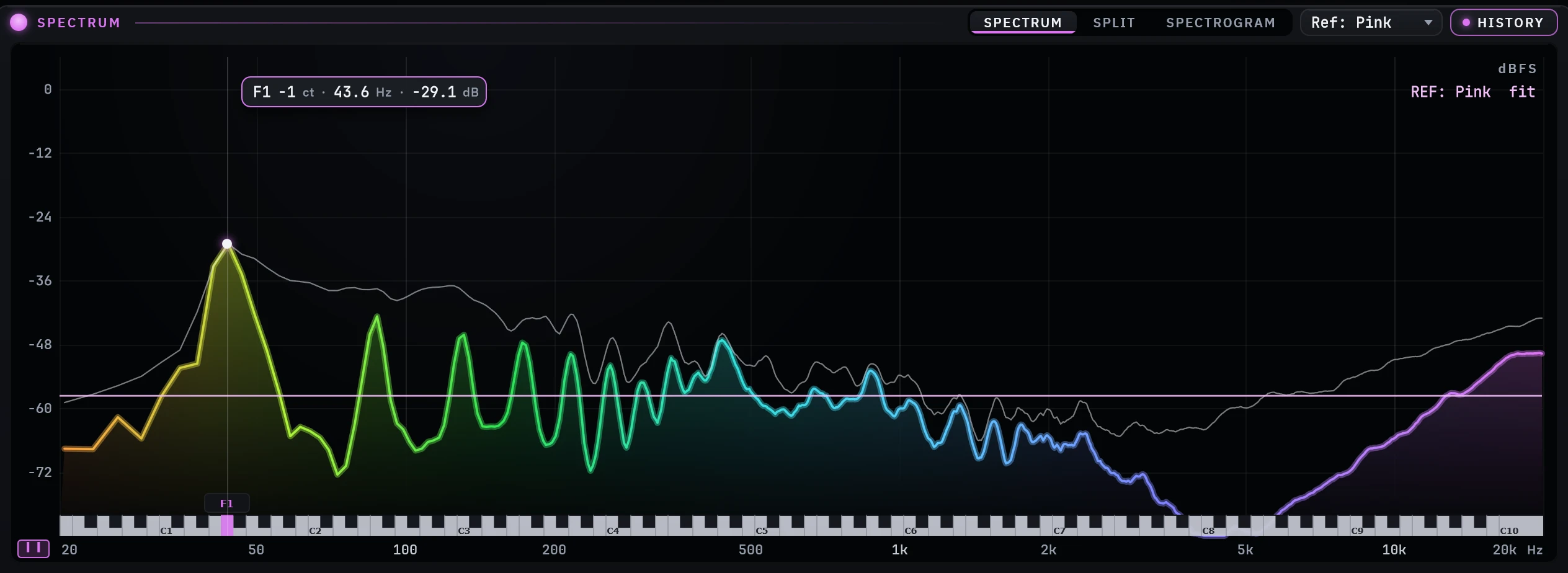
A smooth FFT curve, or up to 320 log-spaced bars, with attack and release smoothing so it reads "fast up, slow down" instead of flickering. Hover anywhere and it shows the frequency, the level and the musical note, with the key lit on the piano strip along the axis. Capture a reference curve and view the difference against it.
- FFT size 512 – 16384, perceptual tilt, adjustable dB range
- Colour by frequency, by energy, or one FLAT colour everywhere
- Reference curve overlay with difference view
- Peak-hold history and a settable dB scale
Spectrogram
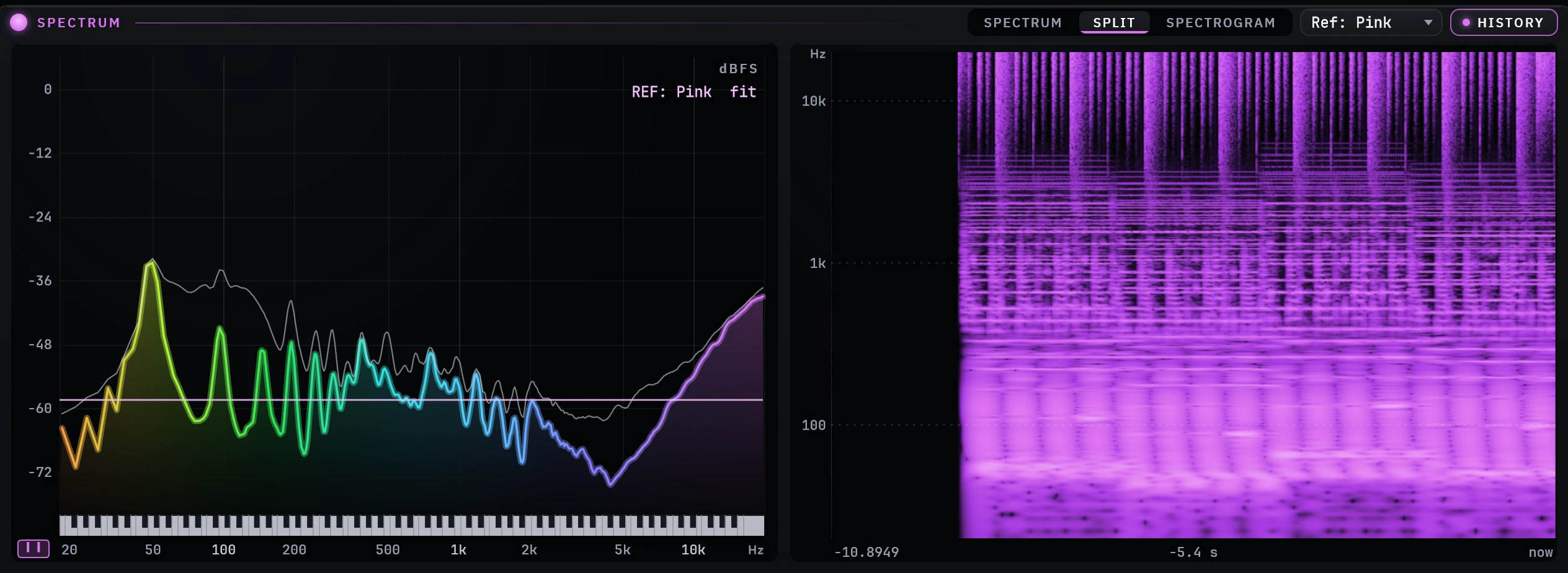
Three FFT sizes crossfaded, so the low end stays detailed while transients stay crisp. Each frame writes one column into a circular image, which is what makes it scroll smoothly rather than step. Run it in place of the spectrum, or side-by-side with its own draggable divider.
- 32768 / 8192 / 2048 FFTs, PSD-normalized, seamless crossovers
- Frequency scale: Log, Linear, Mel
- Palettes: Magma, Ice, Fire, Aurora, Mono
- dB floor, low/high bias, and freeze to hold a passage still
Oscilloscope
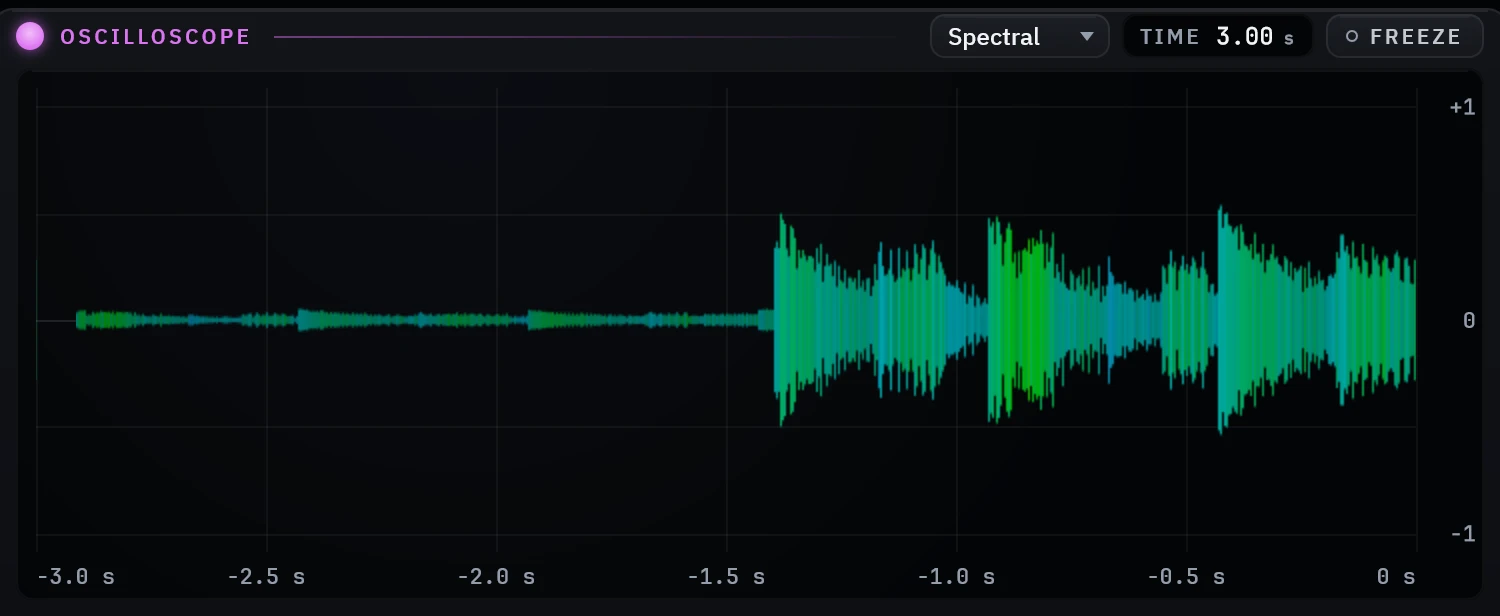
Two modes. Sync triggers on a zero crossing and draws the raw waveform, for checking phase and transient shape. Scroll renders a min/max envelope into a scrolling image, split into low, mid and high bands and coloured accordingly: a kick is red, a vocal is green, hats are blue.
- Time window 10 ms – 5 s (3 s default)
- Whole-pixel scroll accumulator, jitter-free at any window
- Peak-history overlay, anti-flicker envelopes, mirrored fill
Goniometer
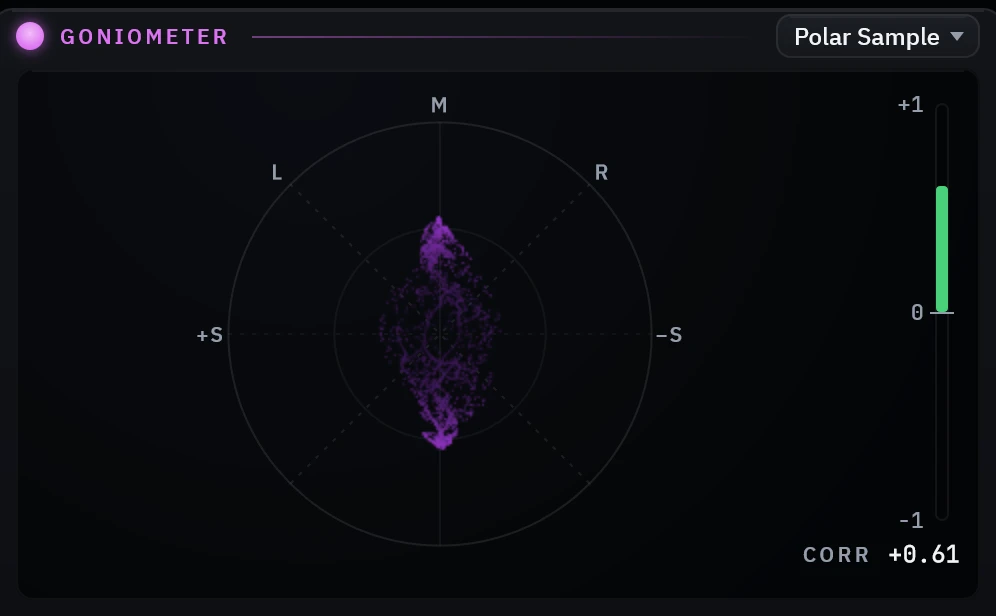
Left and right rotated 45° and drawn as a connected curve into a phosphor-persistence image: a vertical smear means centred, a horizontal one means wide, and a diagonal lean means one side is louder. The correlation rail underneath is the early warning. If it swings negative, something is going to disappear when a club sums to mono.
- Modes: Lissajous, Polar Sample, Polar Level (Peak / RMS / Envelope)
- Persistence, dot size, guides, and normalize (off by default, true levels)
- Correlation meter from −1 to +1, updated every frame
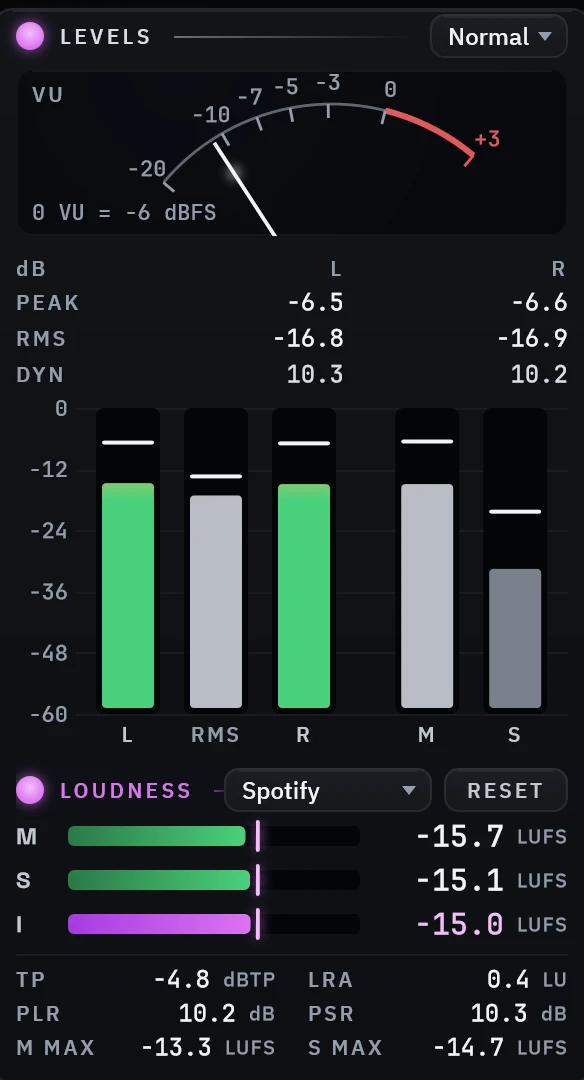
Levels & loudness
Peak and RMS bars with a floating crest segment, peak-hold and over lights, plus the full broadcast loudness suite underneath. Pick a platform in the header and the target line appears; go over and it turns red. Loudness runs on the audio thread and is published through atomics, so the readouts are honest at any buffer size.
- LUFS Momentary / Short-term / gated Integrated (ITU-R BS.1770-4)
- True Peak in dBTP, 4× oversampled · LRA (EBU R128, P95−P10)
- PLR / PSR and Mid/Side maxima
- Targets: Spotify, YouTube, Apple, Tidal, Amazon, Deezer, Club, EBU, ATSC
- K-System scales (K-20 / K-14 / K-12) and an analog VU with settable 0 dB reference
Every panel above is a real capture of the window running: posed on a factory preset with audio playing, cropped to the panel, nothing retouched.
Runs without a DAW, and stays out of the way
The standalone listens to whatever your PC plays: referencing, checking a bounce, a set. No routing, no virtual cables. Press MINI and all five analyzers collapse into a strip you can pin above your session and forget about.
- System-audio capture (WASAPI loopback), on by default
- Follows your default output device automatically
- MINI strip for a second monitor or the top of your screen, state persists

Focus & channel
Band-zoom every analyzer at once (Low / Mid / High) and audition Stereo, Mid, Side, L or R from the header.
Your layout, kept
Every divider drags and every panel has its own gear. The arrangement is saved with the session and restored when you open it.
Watch it work
The real plug-in window on real audio, and what you hear is Prisma's own output. These have sound. Click to play; nothing on this page plays them for you.
Prisma reads a mix
Every analyzer live on one groove, then the spectrogram opens beside the spectrum.
Focus: solo what you see
Zoom every analyzer into the lows, mids or highs, without touching the audio.
Full window to MINI strip
One click folds all five analyzers into a strip you can pin above your session.
Three rooms, one window
Your room is lying to you
Untreated rooms hide low end and exaggerate the top. The spectrum shows what is there, the correlation rail catches the wide synth that disappears on a phone speaker, and the LUFS readout tells you where the track lands on Spotify before you upload it.
Check a track before it checks you
The standalone listens to whatever is playing, so you can run a promo through it straight from your system audio. A flat oscilloscope and a PLR under about 8 tell you how hard a master has been pushed before you play it out, and MINI mode keeps all five meters in a strip above your library.
Deliverables that pass first time
Integrated LUFS, LRA, and 4× oversampled True Peak to ITU-R BS.1770-4, with platform and broadcast targets in the header. Capture a reference curve, switch to difference view, and see exactly where your mix departs from it.
How it is built
Real-time safe by construction
No allocation, no locks, no file access in processBlock. Audio reaches
the display through a lock-free ring buffer, and the GUI does the heavy FFT work on
its own thread. Five analyzers therefore cost one instance of CPU, not five.
Bit-transparent by default
The signal that arrives is the signal that leaves. The one exception is opt-in: selecting Mid, Side, Left or Right in the header auditions that channel, which is the purpose of the control.
Written to the standards
K-weighting filters, 400 ms Momentary and 3 s Short-term windows, gated Integrated loudness, 4× oversampled True Peak, and an LRA histogram with the −70 / −20 LU gates, implemented to ITU-R BS.1770-4 and EBU R128.
Offline licence verification
Activation is a single signed call. After that the plug-in verifies an RS256 signature against a public key compiled into the binary, so the licence server is never in the critical path of a session and an offline studio opens normally.
Try it for 30 days. Then it's $20.
No account, no dongle. The trial is the complete plug-in: nothing disabled, nothing muted, no noise injected.
Install and run
Run the installer, rescan your plug-ins or launch the standalone. Your 30 days start on first run and the countdown sits in the corner of the window.
Buy when you're convinced
$20 through Stripe, paid once. Your serial arrives by email within seconds: a lifetime licence for up to three machines, no renewal.
Activate in place
Gear icon → MAIN → Activate…, paste your email and serial. Nothing to reinstall, nothing to re-authorise, and a plug-in already open in your DAW picks it up within a couple of seconds.
The current release · v0.24.0
The complete suite, free for 30 days. Buy a licence any time and activate in place, nothing to reinstall.
Installing on Windows? Windows may show an “unrecognised app” prompt the first time, because we are a new publisher. Click More info, then Run anyway. The installer is signed, and the publisher shown is Dishit Patel. The macOS installer is signed and notarized by Apple.
System requirements
- Windows
- Windows 10 or 11, 64-bit: VST®3 and standalone app
- macOS
- macOS 11 or later, Apple Silicon and Intel: VST3, AU and standalone app
- Hosts
- Any VST3 host; any AU host on macOS
- Licence
- Lifetime, 3 computers; deactivate inside the plug-in to move to a new one
- Support
- deishmedia@gmail.com
$20 once. Yours for good.
Lifetime licence for up to 3 machines. Your serial arrives by email the moment you buy. Activate right inside the plug-in: gear icon → MAIN → Activate. One activation covers every format on that machine, and it keeps working offline.
Questions or a problem? Licences, machine slots, refunds and bugs: deishmedia@gmail.com. The terms set out the licence and the refund policy.
- Version
- 0.24.0
- Windows
- Windows 10 or 11, 64-bit: VST3 and standalone app
- macOS
- macOS 11 or later, Apple Silicon and Intel: VST3, AU and standalone app
- Hosts
- Ableton, Reaper, FL, Cubase, Studio One, Bitwig, Logic, any VST3 or AU host
- Window
- Opens at 1200 × 660, resizable, MINI strip mode
- Audio path
- Pass-through analyzer, bit-transparent
- Metering
- ITU-R BS.1770-4, EBU R128 LRA, True Peak 4× oversampled
- Licence
- $20 lifetime, 3 machines, verifies offline
What changed
v0.24.0 · 2026-08-06
The analog Vintage theme, and honest A/Bs
- The Vintage theme is a full analog rebuild: charcoal metal panels with machined edges and screws, cylinder knobs, silkscreen legends, the same hardware language as Base6ix
- Reference comparison is now loudness-matched (ITU-R BS.1770-4), so dropping a file on the spectrum shows a difference in tone, not level, with the applied offset printed on the panel
- New setting: gear → Spec → Match loudness (default on)
v0.23.0 · 2026-07-31
Self-serve device deactivation
- Free up a device slot yourself: gear → MAIN → License → Deactivate this device, no email needed
- Four themes (RGB, Neon, Mono, Vintage) refined and matched across the whole suite
- Fixed: loading a preset no longer silently turns off your FLAT spectrum colour
v0.22.0
Trial and in-app activation
- Activate from inside the plug-in: gear → MAIN → Activate…
- Licences verify offline on every launch (RS256, Windows CNG)
- The trial is now 30 days; a licensed install ignores the clock entirely
- Activation is picked up live, an open plug-in notices within ~2 seconds
- The gear stays clickable when the trial expires, so activation is always reachable
v0.21.0
Compact mode
- MINI: every meter collapses into a full-width strip, state persists
- Spectrum and spectrogram side-by-side with their own divider
- Three new presets: Dual View, Broadcast, Low End
- Light theme reworked; header controls aligned on one baseline
- Fixed a standalone crash entering compact mode
Questions
Does it change my audio?
No. Prisma is a pass-through analyzer: what goes in comes out, bit for bit. The single exception is opt-in, choosing Mid, Side, Left or Right in the header auditions that channel, which is the entire point of the control.
Is the trial limited in any way?
Only in time. All five analyzers, every preset, both formats. After 30 days the analyzers stop until you activate a licence.
What does $20 actually buy?
A lifetime licence for Prisma Suite on up to three of your machines, including future 0.x updates and 1.0. No subscription and no renewal.
What if I buy a new computer?
Three machines is a soft limit. Email us and we'll clear a slot from an old one; the licence itself never expires.
Does it need an internet connection?
Once, to activate. After that the licence is verified locally against a public key compiled into the plug-in, so an offline studio opens normally.
Is the installer signed?
Yes. The Windows installer is code-signed, and the macOS package is signed and notarized by Apple.
Mac version?
Yes: AU, VST3 and the standalone app, in a signed and notarized installer. One licence covers Windows and macOS machines alike, up to three in total.
Which DAWs are supported?
Any VST3 host on Windows or macOS, and any AU host on macOS: Ableton Live, Reaper, FL Studio, Cubase, Studio One, Bitwig, Logic Pro and friends. The standalone needs no host at all and listens to your system output.