 Deish Media
One dial. Two directions.
Fiya Eye is a distortion plug-in built around a single dial. Turn it left for DESTROY, right for ENHANCE, and watch the eye change its mind. Behind the eye is a full multiband engine, open whenever you want it.
For a limited time only, $30. Try the complete plug-in free for 30 days. After the trial you buy a licence to keep using it: a one-time purchase, no subscription.
Fiya Eye, in numbers
- Main control
- One dial, -100 to +100
- Scenes per preset
- 2
- Factory presets
- 104
- Distortion algorithms
- 44
- Component cards
- 16
- Slots per chain
- 10
- Macros
- Up to 8
- Oversampling
- Off, 2x, 4x or 8x
- Licence
- $30 once (limited time), 3 machines
The eye is the interface
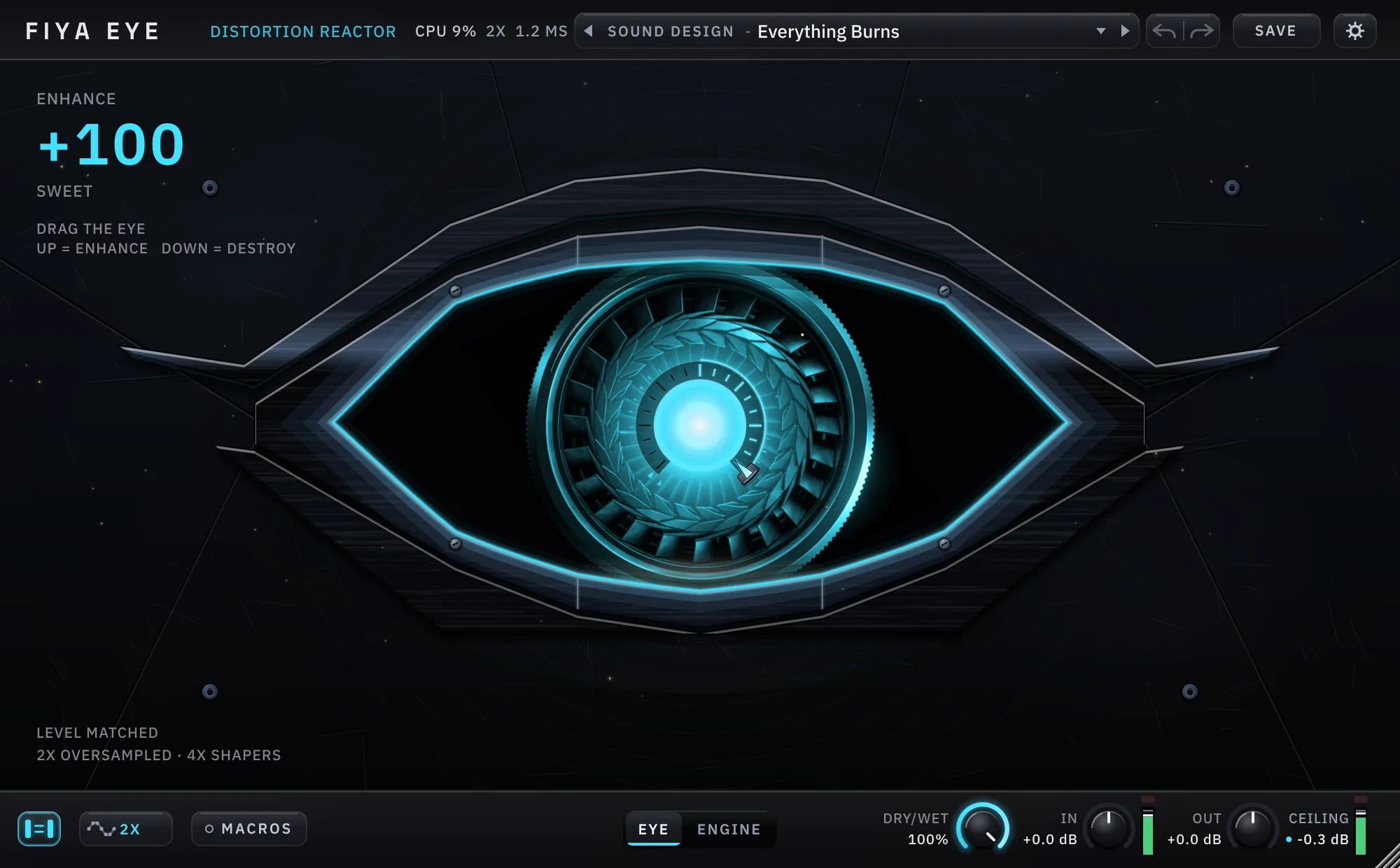
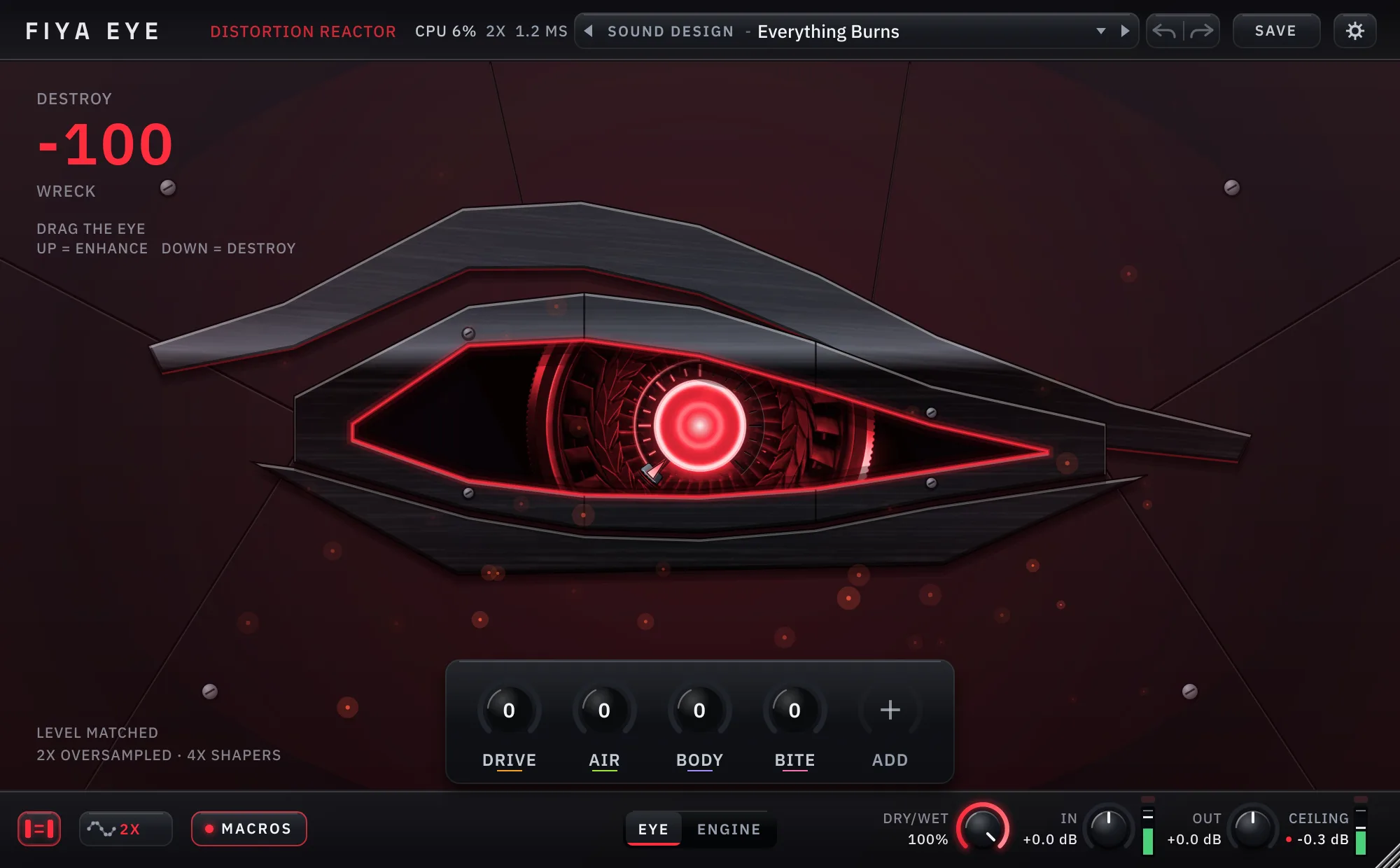
The face of Fiya Eye is a black-chrome eye with a turbine for an iris. The dial is the whole plug-in at a glance: at 0 the eye is white and the wet signal is 0%, and the further you turn, the more the eye and the sound change together. Drag the eye itself, or turn the dial.
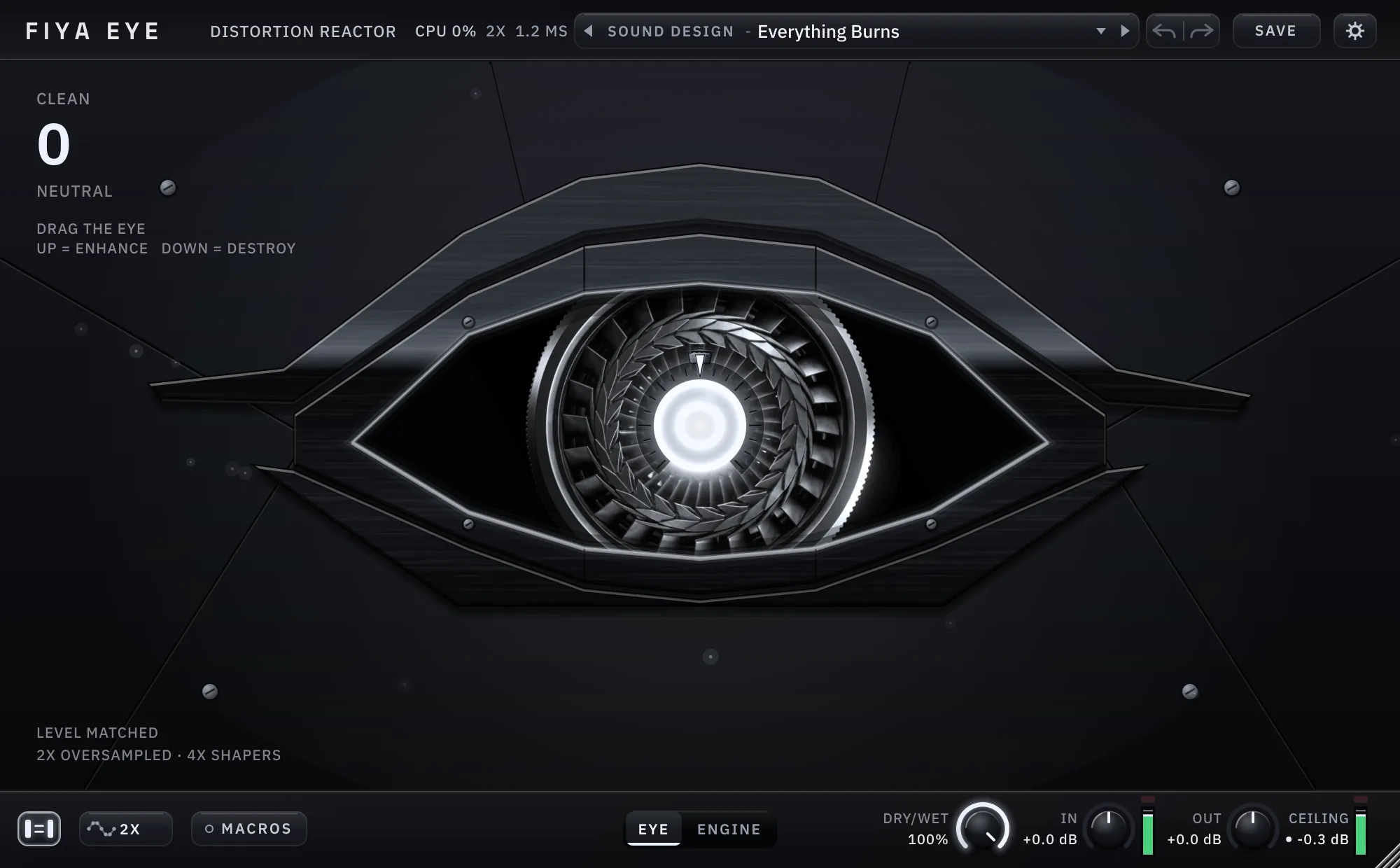
Left is DESTROY
Turn toward -100 and the eye takes on a red glare and an angrier look, while the DESTROY scene's distortion comes in.
Right is ENHANCE
Turn toward +100 and the eye turns cyan and opens up, while the ENHANCE scene's processing comes in.
Easy first
You can stay on the face and only touch the dial. Level is matched as you turn, so you hear the character rather than a jump in loudness. The first half of each side is also a dry/wet: 0% wet at the centre, fully wet from 50 out.
Deep on demand
Switch from EYE to ENGINE and every stage the dial is moving is open to you. EYE MAP lists each setting that moves with the eye.
Two scenes, one engine each
Every preset holds a DESTROY scene and an ENHANCE scene. Each is a complete engine with its own bands and its own chains. The DESTROY | ENHANCE switch picks the one you are editing, and the dial sets how much of it you hear.
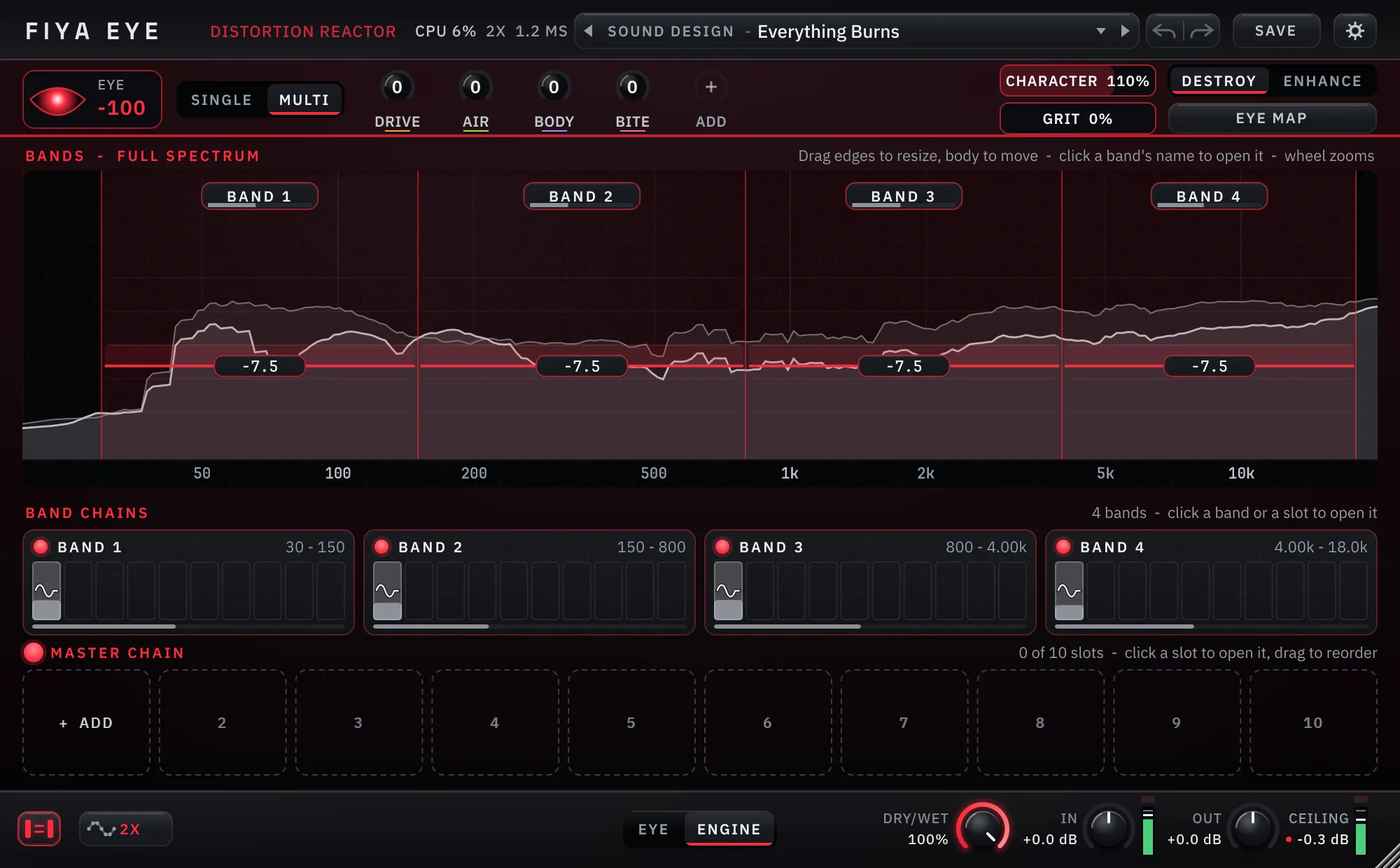
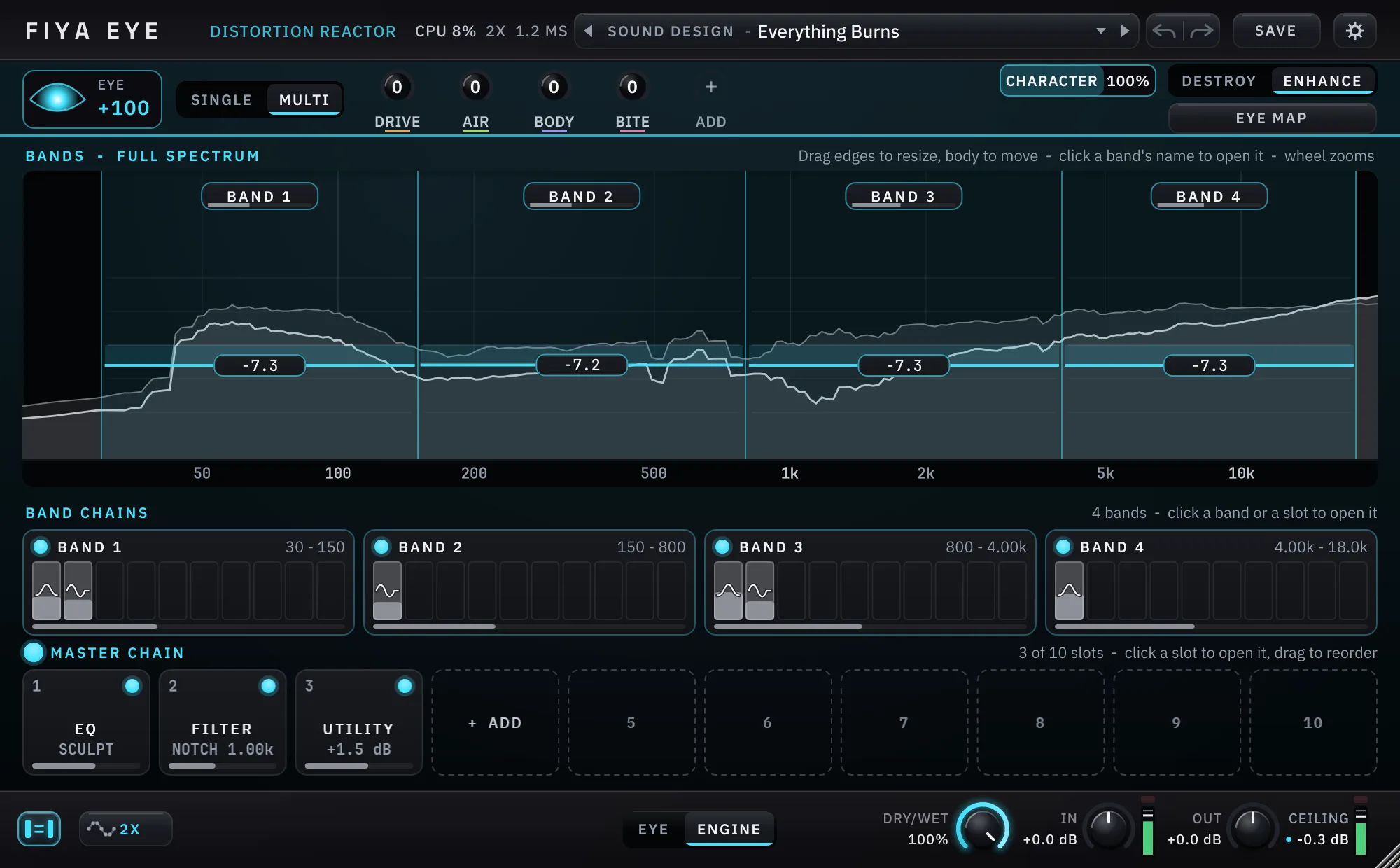
SINGLE or MULTI
SINGLE is one master channel. MULTI splits the spectrum into bands you draw, and each band gets its own chain. Drag a band's edge onto its neighbour and the two link, sharing one crossover.
Zoom and watch
The spectrum zooms with the mouse wheel, each band shows its level, and every slot has its own power lamp.
Eight macros
Macros show only the ones you use, plus a "+" slot that wakes the next, up to eight. The MACROS pill opens them over the eye.
EYE MAP
A panel that lists every setting the eye moves and every macro assignment, so nothing about the dial is hidden from you.
Sixteen components, ten slots a chain
Every band, and the master channel, holds a chain of up to ten slots. Add components from a menu, reorder them by dragging, switch any of them off with its lamp.
DISTORT
44 algorithms, each with its own drive, tone, bias and mix controls, a transfer-curve view, and a readout of the harmonics it adds. Two tape models carry an optional hiss and a motion switch.
44 ALGORITHMSTRANSFER CURVEHARMONICS
AMP and REVERB
An amp stage with preamp models and cabinets, and a reverb with its own distance model, so a distorted signal can sit in a space.
AMPREVERBDELAY
Dynamics
COMP, LIMITER, CLIP, OTT, GATE and TRANSIENT, with gain reduction drawn in neutral grey and red only for a real over.
COMPLIMITERCLIPOTTGATETRANSIENT
Tone and space
EQ with dynamic points, FILTER, PHASER, WIDTH, SPREADER and UTILITY round out the set.
EQFILTERPHASERWIDTHSPREADERUTILITY
Level you can trust, meters you can read
The bottom bar carries the dry/wet, IN and OUT trims, a CEILING and level meters. LEVEL MATCH keeps the loudness steady as you turn the dial, and OVERSAMPLING is a switch away.
An output you control
New instances end in a brickwall limiter, on by default and switchable, followed by a plain OUT fader with nothing after it.
Safe with bad input
A stray NaN or a runaway sample is caught before it reaches the stages, so one bad block does not silence the plug-in.
104 factory presets
Drums, bass, vocals, guitar, synth and keys, mix bus, lo-fi, creative FX, multiband, sound design and bass design. SAVE stores your own.
Try it free for 30 days
Stablev1.0.1
The first release
The complete plug-in on a 30-day trial: nothing disabled, nothing watermarked. The same download becomes the licensed version when you activate a serial.
Installing on Windows? Windows may show an “unrecognised app” prompt the first time, because we are a new publisher. Click More info, then Run anyway. The installer is signed, and the publisher shown is Dishit Patel. The macOS installer is signed and notarized by Apple.
When the trial ends, you need a licence. After 30 days the window greys out and the plug-in is silent until you activate a serial. Nothing is deleted and nothing expires from your projects: activating brings everything straight back. To activate, open the gear icon in the top-right corner and choose “Activate license...”.
System requirements
- Windows
- Windows 10 or 11, 64-bit: VST®3 and standalone app
- macOS
- macOS 11 or later, Apple Silicon and Intel: VST3, AU and standalone app
- Hosts
- Any VST3 host; any AU host on macOS
- Window
- 1000×620 default, resizable from 720×440
- Licence
- Lifetime, 3 computers; deactivate inside the plug-in to move to a new one
- Support
- deishmedia@gmail.com
Current
v1.0.1
- Activates with the Everything bundle (all seven plug-ins). The sound is unchanged.
Earlier
v1.0.0. The first release.
- One eye-shaped dial from DESTROY to ENHANCE in front of a modular engine with SINGLE and drawn MULTI bands.
- 44 distortion algorithms, an amp stage, reverb, EQ and dynamics, 16 components in all, ten slots to a chain.
- Up to eight macros, 104 factory presets and your own saved presets.
- Level match, oversampling up to 8x, a brickwall limiter and a plain OUT fader.
- Stress-tested against damaged sessions, editor churn and a 25-minute soak before release.
Exactly what you get
The whole plug-in and every factory preset, on three of your machines, for good.
For a limited time only. $30 is a limited-time price. Buy while it is on and the licence is yours for good.
Try it for 30 days first, then buy. The trial is the complete plug-in: no account, nothing disabled, nothing watermarked. When the 30 days are up you need to buy a licence to keep using it. It is a one-time purchase, not a subscription.
Paid once, yours for good. A licence is a lifetime licence for three machines, with every future version of Fiya Eye included.
Questions or a problem? Licences, machine slots, refunds and bugs: deishmedia@gmail.com. The terms set out the licence and the refund policy.
- Version
- 1.0.1
- Type
- Audio effect, distortion
- Presets
- 104 factory, plus your own
- Windows
- Windows 10 or 11, 64-bit: VST3 and standalone app
- macOS
- macOS 11 or later, Apple Silicon and Intel: VST3, AU and standalone app
- Trial
- 30 days, the complete plug-in, then a licence is needed
- Price
- $30 once, for a limited time
- Licence
- Lifetime, 3 machines, verifies offline
Questions
Is it a single distortion or a toolkit?
Both, depending on how you use it. On the face it is one dial. In the engine it is bands, EQ, 44 distortion algorithms, an amp stage, reverb and dynamics, with a separate setup for each side of the dial.
Does the dial change my level?
Level is matched as you turn, and a brickwall limiter you can switch off sits before the OUT fader. The first half of each side is a dry/wet, so the centre is your dry signal.
What happens after the 30-day trial?
You need to buy a licence to keep using it. The window greys out and the plug-in is silent until you activate, and nothing is deleted from your projects. The licence is $30 once for a limited time, lifetime, on three machines.
Is $30 the permanent price?
No. $30 is a limited-time price. The model does not change: one payment, a lifetime licence, three machines, no subscription.
Does it work on a Mac?
Yes. The macOS installer has VST3, AU and the standalone app for Apple Silicon and Intel Macs, and one licence covers Windows and macOS machines alike.
Are the pictures and clips real?
Yes. Every image and loop on this page is the running plug-in, drawn by its own code with music playing through it, cropped to the editor and nothing drawn in afterwards.